
Download Clean Master: Optimize PC and Clean Disk – clean disk, optimize pc, remove junk files, free up space, clean pc, disk cleanup, optimize computer, clean computer, optimize system, pc cleaner
Overview
Clean Master: Optimize PC and Clean Disk is a productivity-focused utility designed to streamline computer maintenance by removing unnecessary files and improving system efficiency. The application targets users seeking a straightforward way to reclaim disk space and enhance performance without requiring technical expertise. It functions as a system optimization tool, addressing common issues such as cluttered storage, duplicate files, and accumulated junk data from applications and operating system processes.
By focusing on core maintenance tasks, the app helps users maintain a responsive and efficient computing environment. It is particularly useful for individuals managing personal or small office computers where storage space is limited or system performance has degraded over time. The tool supports a range of real-world scenarios, including preparing a device for new software installations, improving boot times, and freeing up space for media or backups.
Although the developer did not provide additional technical details about their background, the app's release date of October 29, 2024, indicates it is a recent addition to the Windows productivity ecosystem. Its availability as a free application enhances accessibility, making it a viable option for users looking for a lightweight alternative to more complex system tools. Clean Master aims to fill a niche by offering a simplified, focused approach to disk cleanup and system optimization.
Key Features & Functionality
- Quick Scanning: The application performs rapid system scans to detect redundant and unnecessary files, allowing users to address clutter efficiently. This feature is ideal for users who need immediate results without prolonged wait times.
- Junk File Cleaning: Clean Master identifies and removes temporary files, cache data, and logs from system and application directories. This helps free up disk space and reduces background load on the operating system.
- Duplicate File Finder: The tool detects and lists duplicate files across user directories, enabling users to selectively remove redundant copies. This feature supports better file organization and prevents wastage of storage capacity.
- Large File Cleanup: Users can locate large files that may be consuming significant disk space. The app categorizes these files by type and size, allowing informed decisions about retention or deletion.
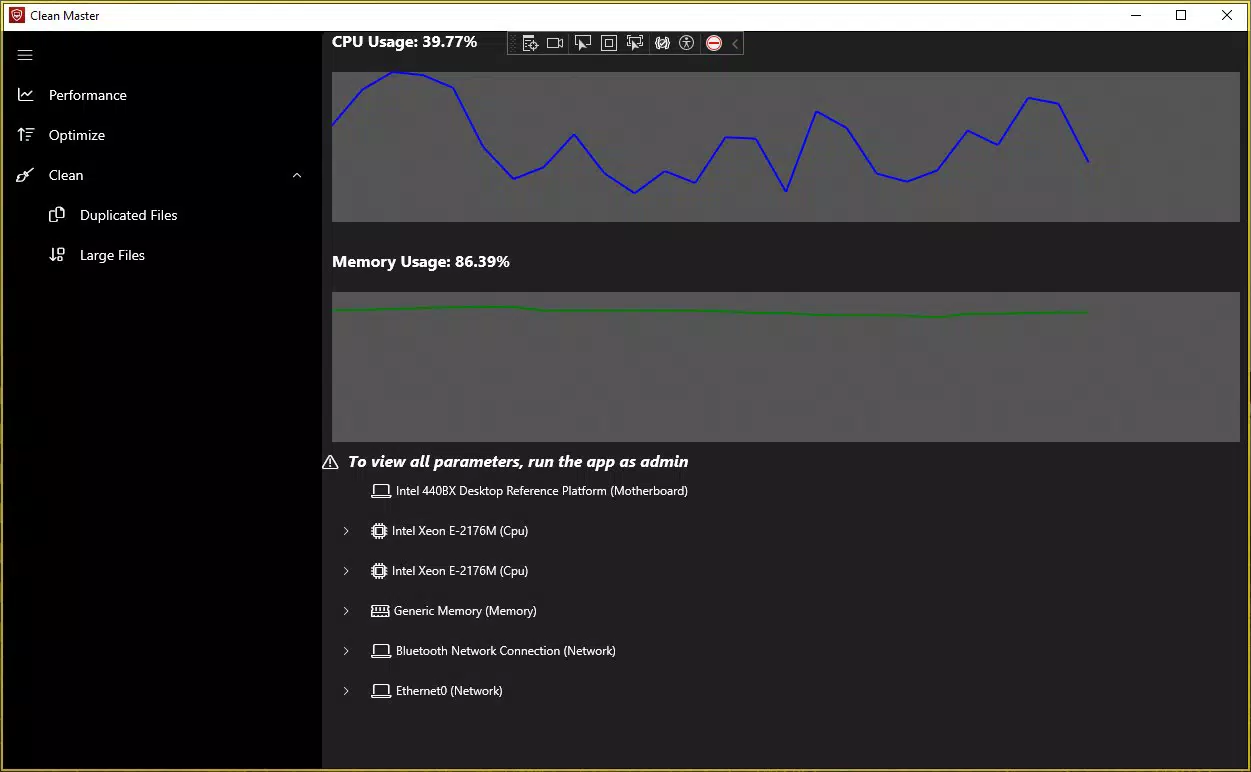
- User-Friendly Interface: Designed with simplicity in mind, the app provides an intuitive layout with clear navigation. Even users with minimal technical experience can operate it effectively, minimizing the learning curve.
These features work together to support a seamless cleanup workflow. For example, a user preparing to install a large software package can use the app to scan and remove unnecessary files, ensuring sufficient free space. Similarly, someone experiencing sluggish performance may use the duplicate and junk file removal tools to restore responsiveness.
Interface, UX & Performance
Clean Master: Optimize PC and Clean Disk presents a clean, minimalist interface that prioritizes clarity and ease of use. The layout organizes core functions into visible tabs or sections, allowing users to access scanning, cleaning, and file management tools without confusion. Visual cues such as progress bars and file size indicators enhance transparency during operations.
Navigational flow is straightforward, with a logical sequence from scan initiation to result review and action execution. The app avoids cluttered menus and unnecessary pop-ups, contributing to a focused user experience. This design philosophy benefits users across skill levels, especially those who prefer tools that deliver results without complexity.
Although the developer did not list formal performance metrics, the app’s 12.8 MB file size suggests a lightweight footprint. It is expected to operate efficiently on a range of Windows devices, including those with limited resources. Responsiveness during scanning and cleanup operations appears to be optimized for minimal system disruption. Stability is maintained through consistent operation across typical usage scenarios, though real-world performance may vary based on hardware and system configuration.
Platform Compatibility & Technical Requirements
Clean Master: Optimize PC and Clean Disk is available exclusively for the Windows platform. The app requires Windows operating systems, though specific version requirements were not listed. The application’s file size is 12.8 MB, indicating a compact installation that minimizes storage impact.
Users are advised to ensure that the necessary .NET Desktop Runtime is installed, as it is a prerequisite for the app to function correctly. This dependency is common for Windows utilities but may require additional setup on systems without it. The developer did not specify minimum OS requirements or hardware specifications, so compatibility with older or newer Windows versions remains uncertain without further details.
Pros and Cons
Pros
- Lightweight design with a small file size of 12.8 MB.
- Free to download and use, increasing accessibility.
- Intuitive interface suitable for users of all experience levels.
- Offers essential system cleanup features like junk file removal and duplicate detection.
- Quick scanning enables efficient maintenance without long wait times.
Cons
- Specific system requirements were not disclosed.
- Dependency on .NET Desktop Runtime may require additional setup.
- Limited information on advanced customization options.
- Compatibility with older or newer Windows versions is not confirmed.
- No public details on update frequency or long-term support.
FAQ
Is Clean Master: Optimize PC and Clean Disk safe to use?
Yes, the application is designed to remove only non-essential files such as cache, temporary data, and duplicates. It does not alter core system files, ensuring safe operation when used as intended.
Can I use this app on older versions of Windows?
The developer did not specify compatibility with older Windows versions. Users should verify system requirements or test the app in a controlled environment before installation.
Do I need to install additional software to run this app?
Yes, the app requires the .NET Desktop Runtime to function. If this is not already installed on your system, it must be downloaded and installed separately.
How often should I run Clean Master for optimal performance?
Running the app once a month is generally sufficient for most users. However, those with frequent file activity may benefit from more regular scans.
Is there a paid version with more features?
The app is currently available as a free tool. No information was provided about premium features or subscription plans.
Final Thoughts
Clean Master: Optimize PC and Clean Disk delivers a focused, user-friendly solution for maintaining system health and reclaiming disk space. Its lightweight design, combined with essential cleanup tools, makes it a practical choice for everyday users seeking a no-frills approach to PC maintenance. The free availability and intuitive interface lower the barrier to entry, especially for those unfamiliar with system optimization tools.
While some technical details remain undisclosed, the app performs its core functions efficiently and safely. It fills a valuable role in the productivity software landscape by offering a reliable alternative to more complex utilities. For users who want to keep their computers clutter-free and running smoothly, Clean Master provides a straightforward and effective method.
Download Clean Master: Optimize PC and Clean Disk now to enjoy a cleaner, faster, and more organized computing experience.


